<?xml version="1.0" encoding="utf-8"?>
<feed xmlns="http://www.w3.org/2005/Atom">
    <id>https://sequine.calcatz.com/blog</id>
    <title>Sequine Blog</title>
    <updated>2025-02-28T00:00:00.000Z</updated>
    <generator>https://github.com/jpmonette/feed</generator>
    <link rel="alternate" href="https://sequine.calcatz.com/blog"/>
    <subtitle>Sequine Blog</subtitle>
    <icon>https://sequine.calcatz.com/img/favicon.ico</icon>
    <entry>
        <title type="html"><![CDATA[Sequine 1.8.0 - Node Group & Command Event]]></title>
        <id>https://sequine.calcatz.com/blog/highlights-v-1-8-0</id>
        <link href="https://sequine.calcatz.com/blog/highlights-v-1-8-0"/>
        <updated>2025-02-28T00:00:00.000Z</updated>
        <summary type="html"><![CDATA[In version 1.8.0, we added two new features: Group, and Command Event.]]></summary>
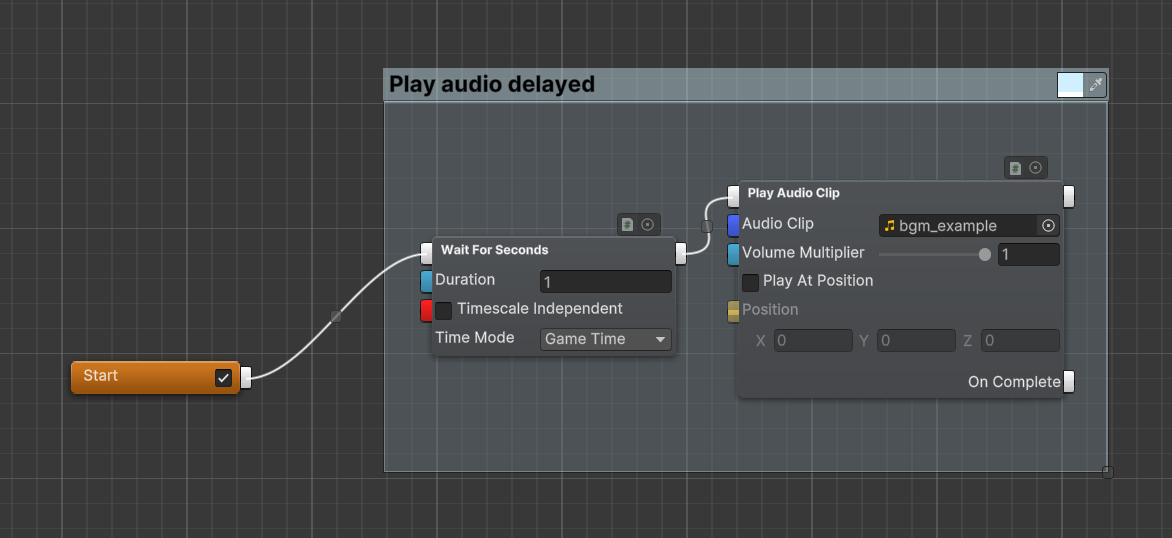
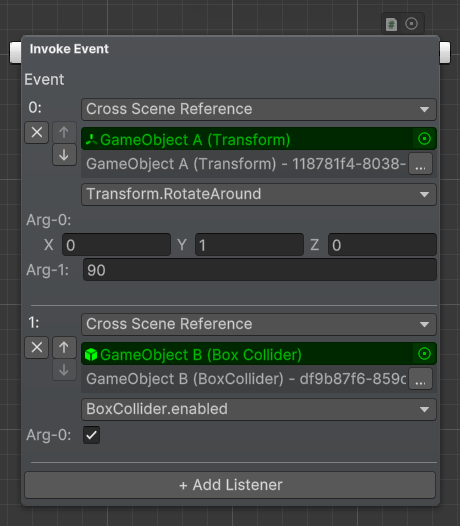
        <content type="html"><![CDATA[<p>In version 1.8.0, we added two new features: Group, and Command Event.</p><h2 class="anchor anchorWithStickyNavbar_LWe7" id="group">Group<a href="#group" class="hash-link" aria-label="Direct link to Group" title="Direct link to Group">​</a></h2><p>Group is an editor feature to help us visualizing and organizing the nodes. Any nodes inside the box will be moved along when the group is dragged.</p><p><img loading="lazy" alt="Node Group" src="/assets/images/9-z-1-command-group-4cb74cd513b19186fd110a24a61b839a.png" width="1172" height="538" class="img_ev3q"></p><p>You can read more about this feature in <a href="/docs/sequine-flow/command-group">Group</a> page.</p><h2 class="anchor anchorWithStickyNavbar_LWe7" id="command-event">Command Event<a href="#command-event" class="hash-link" aria-label="Direct link to Command Event" title="Direct link to Command Event">​</a></h2><p>The built-in <code>UnityEvent</code> can't be used in a command, because it doesn't support cross-scene object references, which is the reason why <code>CommandEvent</code> is created.</p><p><img loading="lazy" alt="Invoke Event" src="/assets/images/invoke-event-8152bb0424a52791cca149014ba62d7e.png" width="460" height="526" class="img_ev3q"></p><p>A new command type, <strong>Invoke Event</strong>, is added. It is a command that simply invoke a Command Event upon execution. We can also use <code>CommandEvent</code> in a custom command script, in case we have our certain rule on which condition that Command Event should be invoked. You can read more about <code>CommandEvent</code> <a href="/../docs/customization/command-event">here</a>.</p><p><a href="https://assetstore.unity.com/packages/tools/visual-scripting/sequine-sequencing-animation-and-visual-scripting-260083#releases" target="_blank" rel="noopener noreferrer">Release Notes</a></p>]]></content>
        <author>
            <name>Dilaura</name>
            <uri>https://twitter.com/dilaura_exp</uri>
        </author>
    </entry>
    <entry>
        <title type="html"><![CDATA[Sequine 1.7.0 - Sub-Flow Input Variables & Bug Fixes]]></title>
        <id>https://sequine.calcatz.com/blog/highlights-v-1-7-0</id>
        <link href="https://sequine.calcatz.com/blog/highlights-v-1-7-0"/>
        <updated>2024-10-02T00:00:00.000Z</updated>
        <summary type="html"><![CDATA[Sub-Flow Input Variables]]></summary>
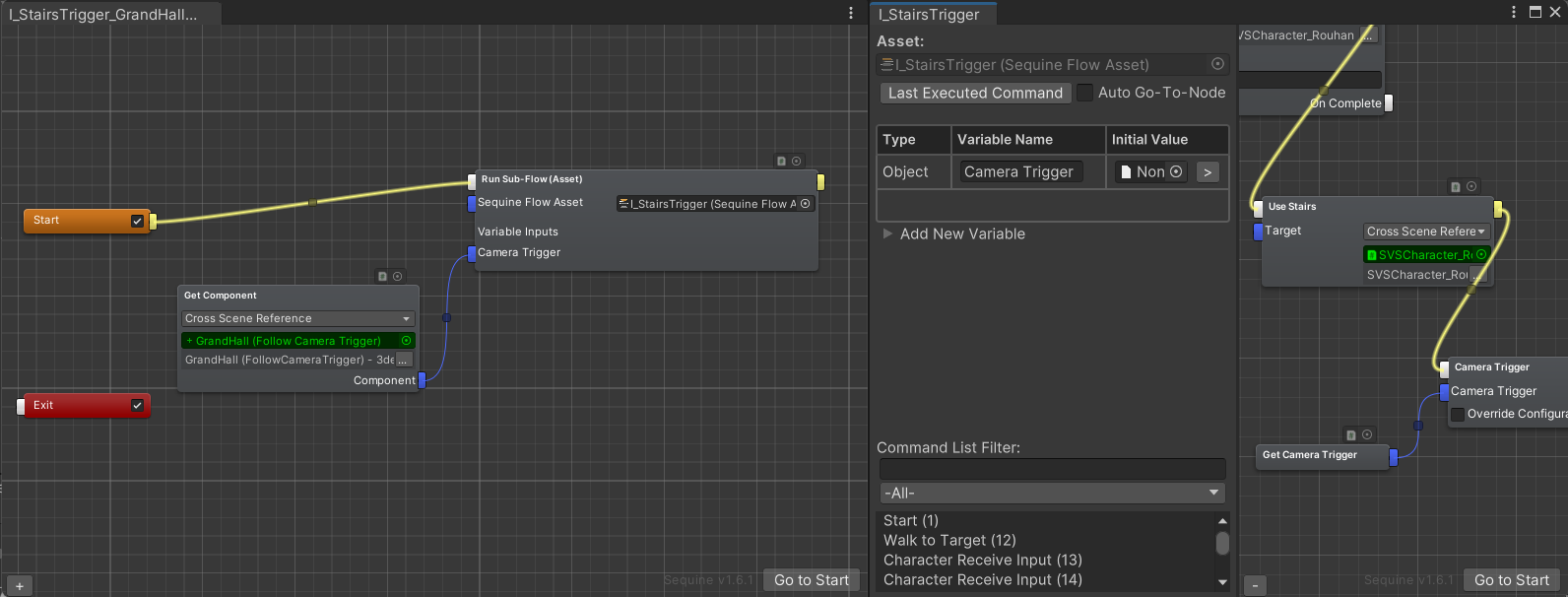
        <content type="html"><![CDATA[<h2 class="anchor anchorWithStickyNavbar_LWe7" id="sub-flow-input-variables">Sub-Flow Input Variables<a href="#sub-flow-input-variables" class="hash-link" aria-label="Direct link to Sub-Flow Input Variables" title="Direct link to Sub-Flow Input Variables">​</a></h2><p>In this version, Sequine Flow's Variables are improved to be able to be utilized outside its scope.</p><p>When executing a Sequine Flow using a <strong>Run Sub-Flow</strong> command, we can pass input values towards the <strong>Variables</strong> of the specified Sequine Flow.
We can think of it just like passing parameters to a function in programming.</p><p><img loading="lazy" alt="Sub-Flow Input Variables" src="/assets/images/sub-flow-input-variables-1a35524f52abe070385f3838a78a21bf.png" width="1592" height="606" class="img_ev3q"></p><h2 class="anchor anchorWithStickyNavbar_LWe7" id="bug-fixes">Bug Fixes<a href="#bug-fixes" class="hash-link" aria-label="Direct link to Bug Fixes" title="Direct link to Bug Fixes">​</a></h2><p>There was quite a major bug when Exit command of a Sequine Flow is disabled, the whole nodes editor GUI will be non-interactable when the Exit command is offscreen.</p><p>This update also includes other minor bug fixes, especially regarding the random/occasional non-immediate refresh of the displayed nodes upon removing nodes, removing connections, and pasting commands.</p><p>You can read more about the new update in the <a href="https://assetstore.unity.com/packages/tools/visual-scripting/sequine-sequencing-animation-and-visual-scripting-260083#releases" target="_blank" rel="noopener noreferrer">Release Notes</a>.</p>]]></content>
        <author>
            <name>Dilaura</name>
            <uri>https://twitter.com/dilaura_exp</uri>
        </author>
    </entry>
    <entry>
        <title type="html"><![CDATA[Sequine 1.6.0 - Localization Support, Auto Draw Commands, and Performance Improvements]]></title>
        <id>https://sequine.calcatz.com/blog/highlights-v-1-6-0</id>
        <link href="https://sequine.calcatz.com/blog/highlights-v-1-6-0"/>
        <updated>2024-08-16T00:00:00.000Z</updated>
        <summary type="html"><![CDATA[Auto Draw Commands]]></summary>
        <content type="html"><![CDATA[<h2 class="anchor anchorWithStickyNavbar_LWe7" id="auto-draw-commands">Auto Draw Commands<a href="#auto-draw-commands" class="hash-link" aria-label="Direct link to Auto Draw Commands" title="Direct link to Auto Draw Commands">​</a></h2><p>Custom command creation is one of Sequine's biggest strength, hence, we wanted to make it easier for people to learn and utilize it.
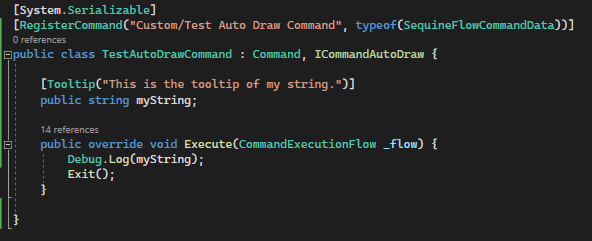
Previously, we were required to write some boilerplates, especially since we needed to define how the command is being drawn in a command editor node.</p><p>Now, with the new <code>ICommandAutoDraw</code> interface and certain attributes, we don't need to write any editor scripts.
Fields, in-points, and out-points are all automatically drawn. For example, drawing a serialized field now is as easy as declaring them as <code>public</code> or with <code>[SerializedField]</code> attribute, just like what we normally do with components.</p><p><img loading="lazy" alt="Auto Draw Script" src="/assets/images/auto-draw-script-4b90116ea75bfee412c3579c3bcecab5.png" width="592" height="241" class="img_ev3q">
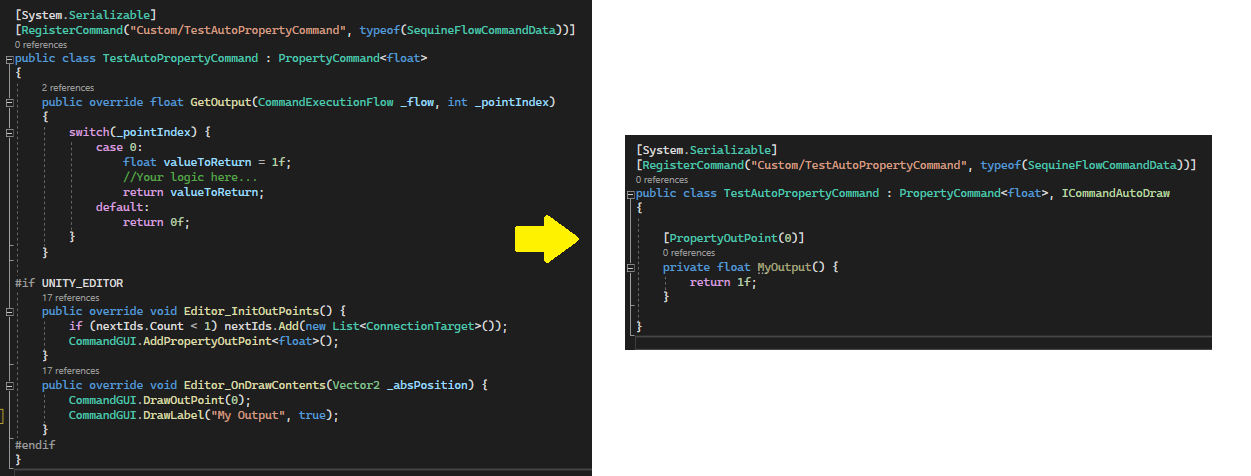
<img loading="lazy" alt="Auto Draw Result" src="data:image/png;base64,iVBORw0KGgoAAAANSUhEUgAAAT0AAADLCAYAAAAcJ0QtAAAAAXNSR0IArs4c6QAAAARnQU1BAACxjwv8YQUAAAAJcEhZcwAAEnQAABJ0Ad5mH3gAAB6dSURBVHhe7Z0HfBTFHsf/EAgtBBJCTUKvgggoUh69qGCXJs2nPjtgl469K4K9oYLtIdieUhQQJGCn1xAgdEIJECAkJEB48//fTtgcl2STuwvJze+bzz+7OzN3u3uz+9v/lJ0p1r1797OUA2XKlJFlamqqLP1BtWrVZLlv3z5Z+oOCOA/swznIc+cgz53j5DyKtW3bNkfRK1eunCxPnDghS38QHR0ty127dsnSHxTEeWAfzkGeOwd57hwn51HcWgIAgBFA9AAARgHRAwAYBUQPAGAUED0AgFFA9AAARgHRAwAYBUQPAGAUED0AgFFA9AAARgHRAwAYBUQPAGAUED0AgFFA9AAARgHRAwAYBUQPAGAUED0AgFFA9AAARgHRAwAYBUQPAGAUED0AgFFA9AAARgHRAwAYBSb79iHYh3OQ585BnjvHyXlgsm8fgn04B3nuHOS5c5ycB4q3AACjgOgBAIwCogcAMAqIHgDAKCB6AACjgOgBAIwCogcAMAqIHgDAKCB6AACjgOgBAIwCogcAMAqIHgDAKCB6AACjgOgBAIwCogcAMAqIHgDAKCB6AACjgOgBAIwCogcAMAqIHgDAKCB6AACjgOgBAIwCogcAMApM9u1DsA/nIM+dgzx3jpPzwGTfPgT7cA7y3DnIc+c4OQ+Ing/BPpxTFPP89OnTdOrUKTpz5oysM0FBQbLkMH/hZB8lSpSQdCVLlpT1vGJSnqNODwAHsMglJydTRkaGiErp0qXFypYtK6a3nVpISIhj4xuZLac4Fjs+Nj5GLcjAMxA9ABzAHh4Li/a6CgvFihUT4+NiMeZj5GMF2QPRA8ABXLQsbILnTvHixeUY/VnUDgQgegA4oCgVGVG8zRmIHgCFkBo1alCrVq2offv2suTt3OBiLsgdtN76EOzDOUUtz5OSkqQBQsMC07t3b6patapseypS7ty5k/744w86efKkFXKO7FpYK1SoQM2bN5fvP3TokHwv19OFh4dLQ8WaNWvo6NGjVurzYS+P91exYkUrxBkm5Tk8PQDyAYtSRESEteWZmjVrUps2bahUqVJWSM6w4CknRDrvxsTE0Pr16yk2NlaWS5YskXCO53Qg/0D0APABZ8+epbT0NEo/lZ65PKv+ateuLULlpOjJHl58fDxt3rzZCskKh3M8pwP5B6IHgA9IO51GWxPiafeB3bRt7zY6kHSQzma4ao5Y+HITPa6z4zR2wdP9Abl4q9HxTur4gGcgegB4QcbZDEpOTaZ9ifsp8fhBOnhM2fFESj5xnJJPnpB4J/B7qVyHp2HB69ixI3Xu3Jk6dOiQRfgOHz6c+R4ryDsQPQC8gIu1J9NPUuLRg3T4xBHaf/wAJaYcUoKXTKlpqRLvBPbo7I0hLHrBwcHi/fHS3keQ09kbVUDegOgB4AVBxYMoPDScalWrRRGhEVQ1rCpVUtt1atShKhUrS7wTuMXVLmzcCpueni6iyUu7IHI6Ty3CwBkQPQC8gBssdu7fKXV5x04co2PJx+i4KtomHEpQHmCalSp3uGWWu6VoWPS4xXbx4sW0dOnSLK+WVapUya/DMwU6ED0AvICLnyVLlCQuxFYoFUqhpcorC6VyZcpR8eLOOwvv3btXlg0aNJAlo/vc2QWP49n70+lB3oHoAeAFXPcWUSGCQsqGUFj5cLEa4TUoMiKKgksGW6mcwR2P69atm0X47HA4x3M6kH8gegB4QTH1x5QoWYLKSPeSElReCWCw8v50nFP4TYs///xTWma55bZp06bUuHFjWfI2h3N8Tm9kgNyB6AHgJcElgqlmRDRFV3ZZpQqVrJi8w4LGdXlbt26VNzm4no+XvM3hOQme05Zi04HoAZAPWGASExNlnev1SgSVyDT3FltOl1dB4jq7FStW0O+//y5L1OH5Dgw44EOwD+cUtTznEYk9DRKgOw3ndeBOT9+VHTxOHsMDDuQEd2thceUGEB5VOS+YlOfw9PIBX1gws4yFR4uK3TTu4b40jac4NhZDPja95GP1lM6JmQBEzwH6guCLis1+kdgtt3hfWKDsg29OTyLiS/PlebBnxt4cH7MdHZ9X2Btzavo8PMWxacFj42Nk79N+7Hm1QAfF22ywZ75e9xRmhyeIYVJSUvx28dj34S8KYh+RkZGy3LNnjyz9ga/Pg8WFRYbFRYuf06KnNzjZB7+lwelY8HR6JreBDnQ8/1a8zr+V/TO5fT4vFJb7vFi/fv1yvDv5vT+GX4XxF2FhYbI8cuSILP1BXs6DBcsudHyxFVMXUvlQ13GWCi5FQXmokwGgsHJGiThz6nQ6pZw4TulpaZmiyYKnzRcUlvscnp4H7F6aFkB+gkbVrCNhISHlM39cAIoyWhxSU1PowL49dOzYsUyRc196S6Hx9CB656OFTq8HlypNjZs0o1TrJe/U1NTz6nYAKIroQQ7KlClDZZXFblxLadZ1rr28QBM9NGS4oQVPGxdtI6Oipa6Duy2wQfBAoMDXMptc20ooakRGyzXPZr8PAgmIXjbYRS+kfAVKUd4dAIEMl2BCyodmEb1ABKLnhhY7uwUVL6aW3HLGFwEMFpjG13hQcc99/AIJY0WPM5Jbkdh4qj6ecIVt+/btYjt27BDj+oclMb9anwIAFHWMFT0Wuz59+oj99ddf8m6jtoSEBBmkkW3//v20bu0a94ciDBaQlpHh2cuzrxd1jBW948eP0/Dhw8WqVKmSWaGbnTmB5y0Iq1jRo+X1XUhv0MfBLXIFCbfy2c+5tMP5Xv0Ndy+qVTOaalSvboUEHty5uGJF7+fDZWEL9Do9Y7uscNF1+fLlss7Db+dG3wGDrbXsGXhzfxo4oJ+1lZV16zfQ2PFPWFv5o327thRavjz9NG++FeKZJyaMpUtbtaT1ap9j8rhPp/vwRIT6HT+e8p615WKf8pS/+/4HmvvTPCuk4GAR7tf3Jrrphusy387Yt28/vfXOe7Rm7TrZDhQevH8YdenciW7oM8AKyR+VKoXT8r//kHV+9U6/6aG7rXjTfQVdVi4w7L1VVN4Im7tX58mcsDhmKT3z3Itim+Li6OTJtMztTz/7wkqVf67o2Z0G9O9rbXmmvBKsFpc0p/T0U3TRRU1EiPKCk33kxt//LKOXXplI730whQ4eOEj33n2n19+ZH/r360NDBt1MmzdvoVcmTqI3335X3bVEj48fi3ljDSYoKirqSWvdI/rNg7wOnZMXKlRwueXcG9xfuJ8H1+mNGD5CJmR2Yt989z/5XE5wkXnv3gSxy1tfRlUqR9Abb70j24m2OU15YMh777mTbrt1KHXt0lmJagbFb9tmxZJ89oER99GAAX2pjVrfv/8AXX/tNdTm8tZUVj3J2rdrQ3Fxm+lIUpL1iXN079ZFPj912ufUqlULdZ5JtDF2k8TxyLvPPfMEpaaeVJ7uTgkbPfIRan3ZZfTnX3/THbff6nEf9uPt3q2rvJ3CQuIOe1PXX3cN/bNsOf3w42zavGUrLfo1hpoq8e3SqSPNmj1XvGo+Bp5X4vbbbhGB/v2Pv6hB/fo0/L67aejgQfSv9m3VkzqFdu92vZfb56Yb6O47bqdFi2PkAXTrv4fKsaxYsYpOpKRQ3z430l0qfvGSpfJuLMMDb44bM5J27tpNo8dOoB07d1F8/DZavXotXXlFT5XuFK1eszbHc9O/1+nTZ2jI4JuVgA6Uc+Q+baMee1i8yBD1W7EXn5e0TE7nq7+LH1wDb+5HtwwZTA0a1BfvVF+/XFx/5KEH5GFSOSJCqjRq165F02d8LfH5pUyZ0rR3j8sT0x6erzy9C3Gfe8LoLiv2kSpysyy1vY5MkzWchxN/7uknqEmjRvSdEtLY2Fi6f/i91LFDe4mvVrWK3Kx8M0/79HN555eLq7GbYkU4ubf8vPm/WIKX9bvZOitxYUH/YdYsKVp26tQhM65UcEmqU7u2uvjKZ4ZFRUZSZA2u6zpLq1avPm8ffLzPPv04XdqyBf3IQrZ5M935n9vophuvy/yOrMac2+ZuEAsX/SpiclGTRpnHMHjQAClq8o1cvnyI3OShoaH0xX+n0zH18GChiIpkb8w1CU7dunWoceOGst21c0f5jubNm8l2h3+1l0m1+VUqvd96dWuLECyOiZFj0OE7d+2kvgMG0rTPPs/13PSxDhrYn7Zt205H1c06eOAAevThB2jduvV0Uj08BqltPq68pM3tfPV3/XvoINqbkEBx6rj4ocHfzfGlSwXTU0+MV8JZT/22i5Vwh1G7tperOObcb58fO5vhv4ETCguGi94px+YrWqkbLFJd3B9M+Ug8l08//1Jd1FuU99FD4vlpyE9TnsWeb5annnmObrvjblr62x908GCiFJlnz5krwuYOP/GbNG6kPKc/pRL6N/WZunVqU3RUlJUiZ5YtX3HePlq2uESEkY/zx9lz6O1336et8fF07dW9rU/lTlKSa4hzLnprflFCOPmNN5W4LhAP+c6776MJTzyljvl35SkuE++iofJumNVr1tBp5eFd3KypnAu/uL5r9266pPnFUodTR3k4y1eslLQa3XDEnm52OD23XxYuos+++JLeV8V1hr3XL6d/RR9+9Ils14w+9/s6SZvb+Wr4+pg67TMpmh84cCAzvmWLFuKhTlUPxRkzv6aJk14XcQTOMFr0LgTVqlaV5YRxY2jGf9VFq4wv5iqVK0s4P9Xn/jyPunbtQtM+mUJvTp5IPXt0l7jc6NixgwhmVbWPO5THEhXlGr6ps/KM8kt1VdRitqiiqmbr1ni56ZwOuhAR4apXTLIVx7krkKZEUBD17nUVTZ74Cs386ksp8km48sSYlJRU2qSK6M2bNaPmFzejAwcPSlGZ17nozOfsLnq6CMUV8+7o4prTc2ORYjJfzreGqkqz5rW1Dw/vJG1u56vhB5+GvUF9TPr33LZ9uyyZ7dt3WGvekRGgLbZ2jBa9U6rY6tQ8lARyN8YtTN8Uo8eMp779BmbasBEPSTzXH7777gc0ZOit9PiTT0t93u233kIXN20qnxPcvlNbZ1WU5VeJypUtSw3q1ZNWWG7F6qTEkONdxXTX0Fi8zbN1ZXZz0N+jsbaPHnWJh4iyFVZZrfN8rOlp6sa2wjJNY23znBFXXdlT0m/YEHsujU6vrGuXLtLyzd7loCG30osvvSpJ7GmWr1xJ9dXDoXXry2jlilVi7PH1uupKSk4+QXGbNmdJv2VLvJx7965d5Rh0eH31u3z/zQwRGkfnxlhxmduMp2299BRn23ZyvoL7NqPWjx9PltUqEeeOm7tdCTp9Po2vv0DHWNHjp+jpU6cdm9u1kasxnsKXLV8pgxcMHjyQoqKj6RJVxPpoynt0y9DBEt+yVUuaMf0Luv66a2mfEjyugGfOZGTI57iI2K5dWyqpnvr2741SxT6uB5q/YCGNVIKqbfbcn8W7bNioofKQEsUD6dXrSurWrSs9cP9w6ctn/x73fXCRl0VliDreRuo7eiivkxsffl28JMvntDF16tShq3v3ks+8PulVEZpPVDHtZFpaZhpGf0Z7MImHDlNwqWC6+upesq3j2ZYrkWMPiasHVqxaRQnKU0xI2Cddc1aqbf597On5QfX5F9PF233lpefp2muvpr59bxQPm8Vwzk8/Ozo3jX1br7tvazzF2bednK/G0/aq1WskHwcPulmulxuuv048Xh3vjcHTC3C4hcep+Qqu4H7uxZfFu5j82svqJhwtLalff/udxK9atZoW/bpYult88O5bUtf3369m0voNG+nHWXOUF5JKY0Y9So0aZp0Qmr08Zulvv8tSs3Spa5vj+UbhbiTlQ0KkdZg9mvht54pIjPs+jicn03MvvESl1M3J4jFi2D1SZ/jx1E+tT5wP17Xdfdd/6Npreluff5nmKPHNjl9jYqTFlFuSP/rwPY+te9w4wPVz3Hq7avVaCVuxcpUsWRA9MUt5Uu+894F0S+IGCm4F5cYd7i/JdZf5OTdf4OR8c4IbmCa/8bZ46U89Pk49oNpQzJLfrFiQG8Z2Tl62bBmtX+e8g+ojo8Zaa76B65T4ZkxT3g97V+5wayc3avA8p3bR5c9xVwhv8oM7nHLHU963Jzztg8O4OMmCyHVs/oDf4mBvkIvovqZCaCilq9/R03cXxLl5wtvz5XzkfNJVJr6AW5bXrloh67pzMhv/Roxe5gd0TjYcbl3l1lFPgsew0PF8qe5eJn/O2wcQe0vZCR7jaR8cxlUC/hQF9mD8IXgMe9jZfXdBnJsnvD1fzkdfCh6jfoqAx2jR81R3l515rACBwQLO+F9gY6zocbcEAIB5mN2QYeuSkpudxR/+DPhD622A4+nNi+wMADOA6AEAQEBRrHv37jlKux6I0l+tagyPKsHwSMX+wv08+EX/b752PiLFMy+8bK0BELhwF5jtW+Nknbus2MfUY7zpsnIh7nNPGD2I6MdTPpJ1Hu0iN55/eaK1BkDgwqK3cf1qWUc/vQCDX7WaOXOm2KFDh6TPU05mr+zFH/4C9Y+H6Ap0jPX0dIdUxj6BN4czPEcAw9sVwsKpyUU8dhsAgQ0XDzdtcL3mB08PAAACAGM9PU+wV8emi7QMD8fUsHEzeTkfgECHR5uOi3W9kw5PDwAAAgCIniPYGYbBTLHABqLnAFe71vmXBgwWeMb/AxuIngOsBl0AAh4TrnU0ZNjIriGjfqOLchx/DuSfw4cSafeuHXT82DH57UHBwA0S5UNDKSq6FoVXirBCXfMFb9nkmps3UBsyIHo2shW9hk0gen4gOfk4rVm1Qob50q8PgYKDX9XivqrNW7SikBDX9JwienEbZR2ttwYDD8Q/HEo8IO9jQvAuDPy78+/P+aAx4VqH6BUx+OmrX/7OLzxdoNM5a/0JzwnLXgS4cPDvr+fmNQWIngP42edu948YRp9N+5hCK4R6jGcbN3Y0ffH5NCqmRMpTfF6Mp2x8/9236IfvvxF7+aUXZFpHe5pgVTSpqp7c9jB3K62e7jwD17333OUxviANFB5MyheInhM8uPwhISFUqVIluqJnTyskKzWqV6f27drKjFfe1IMwPXt0p/uH3yfTM951zzB68JHHZCrDl55/liJr1LBSEV1ySXOZNjInuB6Hpz2cPsP5sFrAIFC8BYzUc7ibghs3eve60vUjusX37nUVnTxpNX5YYTwNYa2a0VnSsYWHVZQJud3DtV115RX0vx9+VKI3WyqBN8dtpokTJ8kcuRdf3FTSyHeoYisLbN06dWSdw6MjIymkXDkKVSJ9WauWsr57125KSU7O/H6dplTJktS0SRM5RpFpK95uNaOjqHmzZlROeYylVBG5bu3aHtM5MlB4sPIEdXogR5Ys+U08uUsvvdQKccH1ZeydzZs/3wpxEaXE5d2335SJvu2MGTWSBg7oZ22dz5nTpzNbpew8+fSz9NNP82Sd9zd40ECp83v6yQmyzjw+YRwNHTKIpn4yhUaNekxEi8M6dnRNDs7wdt+bbqSPprxPo0c9Su+89QY9/+zT8l0aHnPw5Refp7femEwjH3uYpnz4PvXo3o3efGOSlQKAogFEzxGen37JJ5Lp18UxdPXVvawQFx07dJChqZb+9rsV4mL9hg20XxVLO3XqaIUQRUREUNOmF9H8BQutkPP55tvvxdvjOsLLLm0lHpY7X6ni6sRJk2We3CG33CbrmnZt29CDDz9K/foPpA0bY63QrHTr1oUeGzWGhv77dho2/AFq3LgR9ejRzYolGjHsXipdprTE8/ePHT+BBt48wIoFgQM8PaDIyeOfNWsOXd76MmkR1VyjRPDnefOlj587vyxcRF06d7K2iDp36iBCyIKYHX/9/Tc9+NCjIqTjx42hGV99SWPHjKJatWpaKXJm1uy5tHNnzn2jfp63gBISXMN4b9+xg1asXCnFZIbrL9u3b0dTp31GR48elbBt27bT7DlzZB0EDibUOkD0HMDvI7r/aTZv3UKb4uKo11VXSHidOrWpUaOGNOenuZnp9Gf4b8HChVSvXl2KjKoh252VAM5f8IuMWHsu1fl/cVs20/MvvkR9BwykZ557gcoor2vya69S/fr1MtPop7TedoW5PFL3MPftI0lHbCFn6cSJFBlmiNerVasq3WTi4+OtWNfflq3x8ll7WF7+QOHBpHyB6PkA9qSuVMXPEkFBysvrTf8sW6a8t3MdPu2wN7Vh40bq0qmTtPDWr1dPhNApXHzl7x//+JO0dt16uvGG660Y/8Hz/jL2Oj6mdOlS1hoARQeInhOkZYuXNtOo9ZiYGAoqHkQ9e/Sgrl26SNeSLOn0umULFixURdzOYmvXrqP9+5RAuqXRFlwymN56fTK1aN78vLj0tDQqXkxloS1MusfYtgX7tqcwxr6twxi1vmf3Hnmtp02by7Okaa0bcGxheTJQeMjMl8DPGIieA3K7DtLTT9G8+Qto2H330LFjx2jZsuVWjGdiYpZQ1apV6KYbr5eibU6kp6fTgYMH6f4Rw6lVyxZURhU5+dWhmwf0l3q2XxYtslISJSUdFW+sbZs2jmZ4cwp7l9O/mkl33vEf6t+vL7W5vDXdfdcd1LhxYysFCBRQpwccM2v2HHmlZ/acuerCyfnKSVZe019//yMCtXTpb1Zo9kx8bZI0dDz7zFP03bczaerHH0pjycTXJtM//yyzUpHULX773f9o/LjRNGHcGCvUN8z8+ht65533qG3by0X8uI7vwykfW7EAFB2MnezbEyxW3ELKI6zolldeVq5aI3PUFV8x8rFHZF+vTnTez61kyZLSx4/r2A4q7y87ceV+gkFKlFJ9PK8HC52eJY7hvn4PPXg/3dSnvxWSN+Ji12OwgUIA3xMNGzeVdX5wH9y/V9b5oczGYZjs28cU9qGlataqQ2dsN7s38Ktr3OI6YdxYeuTRkeKdFQXuu/ceKTK//sabckGFhYXR4+PHyfSZE5540kqVN+JiN0D0CgEu0btI1vlhuXPHNlnXgsemxc4b0cPQUkUIljt+MvjCuIg6euRI+viTqRSrBM9TmsJoXHyvVbMmzZj+JX35+adi3M1mkhJBT+mdGCg86DwJ/Km+4ellITtPL0p5evZinTdwMUHvpyjCRRR+h/jQ4cOUmJhoheaPzfD0CgXs6TWwPD2+PnfD0wNZ3BMvLeNMBp3NUCtu4UXF9iXso02b4ijxoBI8D/F5MlB4MChfIHoOKKpeWWGnTJmyPm8gAnmDf3/OB40J1zpED1wwwsIjpA8ghO/CwL87//6cDyaBOj0buq5Nd1thuE6vWo1or+oyQPacSE6mI4cTKTXVrCHLCwPs4bHglQsJsUJc98C+va770N5dJZDq9CB6NrITvYrhlbIUAQAIVPjhk3T4kKwHquiheJsNnLlsnOHHkpJ81noLQGGFH/h8rfM1bxe6QAOiZ8P+NLPbmTOnlcu/Wz09ksX4jQh2j2Gwom58LbOdTE2lw4kH5Fp3v/4Z+3pRB6IHADAK1Om5Ya/XY7huT5sO4yUbp7PDs8MzPGGQvwiUfYSHh8uSZ9j3F8iPnGHPjYuxTNmyZaX+jkf14SVjr8/zhZeHhgwbhVH0tKBpgbOLnhZFd9HjkYaZkz5+0d9OoNzIPDcI4+1bHTkB0csZd9HjdRY9HWYXPIiejylMosfYRU8LnF3kdJg7TkVPf09+cDKKhLcUxD6q8pSXCp4fxF8Eym+V2z68ESR30eNrV4f5UvAYiJ6Nwih6Gl63mz3MHfvF6SneFwTKjVy9enVZJiQkyNIfBMpv5c0+chMsHa9Fj/ehw9yX3lJY7nOXpAMAgCHA08sGu6dm9/A0njw5floyKSkpfvP07PvwFwWxj8jISFnu2bNHlv4gUH4rb/aRF0+P13kf9s/4ystjULy1URhFz44n0fMEbjLnQPScUxD70PcH78OXQmcHxdsiBF8EbFznwaa33S23eF9YoOyDu0OweYrzlQXKb1UQ+7BboAPRyweeLhQYLBDMBCB6AACjgOgBAIwCogcAMAqIHgDAKDDZtw/BPpyDPHcO8tw5Ts4D/fR8CPbhHOS5c5DnznFyHijeAgCMAqIHADAKiB4AwCggegAAo4DoAQCMAqIHADAKiB4AwCggegAAo4DoAQCMAqIHADAKiB4AwCggegAAo4DoAQCMAqIHADAKiB4AwCggegAAo4DoAQCMAqIHADAKiB4AwCggegAAo4DoAQCMAqIHADAKiB4AwCgw2bcPwT6cgzx3DvLcOU7OA5N9+xDswznIc+cgz53j5DxQvAUAGAVEDwBgFBA9AIBRQPQAAEYB0QMAGAVEDwBgFBA9AIBRQPQAAEYB0QMAGAVEDwBgFBA9AIBRQPQAAEYB0QMAGAVEDwBgFBA9AIBRQPQAAEYB0QMAGAVEDwBgFBA9AIBRQPQAAEYB0QMAGAVEDwBgFBA9AIBRFOvXr1+O894GBwfLMj09XZb+ICwsTJZHjhyRpT8oiPPAPpyDPHcO8tw5Ts4Dk337EOzDOchz5yDPnePkPFC8BQAYBNH/AcMBzomkDyvlAAAADmVYSWZNTQAqAAAACAAAAAAAAADSU5MAAAAASUVORK5CYII=" width="317" height="203" class="img_ev3q"></p><p>Making in-points and out-points is now also easier to create with <code>[PropertyInPoint(index)]</code>, <code>[PropertyOutPoint(index)]</code>, and <code>[MainOutPoint(index, label)]</code> attributes.</p><p><img loading="lazy" alt="Out-point" src="/assets/images/outpoint-146cdcf6562d92a6cbb4ae50ab496216.png" width="1251" height="476" class="img_ev3q"></p><p>You can learn more in <a href="/docs/customization/auto-draw-command">Auto Draw Command</a> page.</p><h2 class="anchor anchorWithStickyNavbar_LWe7" id="localization-support">Localization Support<a href="#localization-support" class="hash-link" aria-label="Direct link to Localization Support" title="Direct link to Localization Support">​</a></h2><p>Sequine now also supports Unity's Localization package. This enables us to create a command that has <code>LocalizedReference</code> fields, such as <code>LocalizedString</code>, <code>LocalizedAudioClip</code>, and so on.
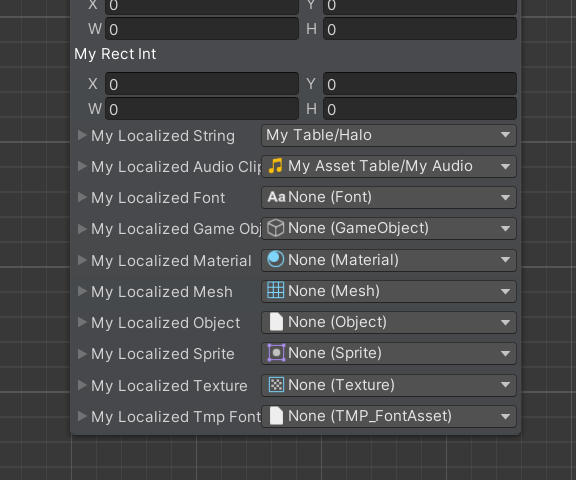
This is also integrated with <strong>Auto Draw Command</strong> feature.
But in case you want to keep using <code>CommandGUI</code> to draw your custom command, then the methods to draw those new fields are also available in <a href="/scripting-api/html/class_calcatz_1_1_cookie_cutter_1_1_command_g_u_i.html" target="_blank" rel="noopener noreferrer">Command GUI</a> class.</p><p><img loading="lazy" alt="Localization" src="/assets/images/localization-f4f5c717a521cb39b297ba889c635e04.png" width="576" height="480" class="img_ev3q"></p><h2 class="anchor anchorWithStickyNavbar_LWe7" id="performance-improvements">Performance Improvements<a href="#performance-improvements" class="hash-link" aria-label="Direct link to Performance Improvements" title="Direct link to Performance Improvements">​</a></h2><p>In this version, we also improved the runtime performance by replacing all <code>Task.Yield</code> with <code>yield return null</code> which doesn't allocate.</p><p>Editor performance is also improved by culling the offscreen command nodes.</p><p>You can read more about the new update in the <a href="https://assetstore.unity.com/packages/tools/visual-scripting/sequine-sequencing-animation-and-visual-scripting-260083#releases" target="_blank" rel="noopener noreferrer">Release Notes</a>.</p>]]></content>
        <author>
            <name>Dilaura</name>
            <uri>https://twitter.com/dilaura_exp</uri>
        </author>
    </entry>
    <entry>
        <title type="html"><![CDATA[Sequine 1.5.0 - Performance Improvements & Major Bug Fixes]]></title>
        <id>https://sequine.calcatz.com/blog/highlights-v-1-5-0</id>
        <link href="https://sequine.calcatz.com/blog/highlights-v-1-5-0"/>
        <updated>2024-07-23T00:00:00.000Z</updated>
        <summary type="html"><![CDATA[Performance Improvements]]></summary>
        <content type="html"><![CDATA[<h2 class="anchor anchorWithStickyNavbar_LWe7" id="performance-improvements">Performance Improvements<a href="#performance-improvements" class="hash-link" aria-label="Direct link to Performance Improvements" title="Direct link to Performance Improvements">​</a></h2><p>In version 1.5.0, we did a lot of adjustments, mainly regarding memory allocations.
The details can be found in the <a href="https://assetstore.unity.com/packages/tools/visual-scripting/sequine-sequencing-animation-and-visual-scripting-260083#releases" target="_blank" rel="noopener noreferrer">Release Notes</a>.
Some of them might affect user's customized codes, especially if you have a custom command that overrides its <code>GetOutput</code> method, as now we use strongly typed output, where we should no longer cast our output into <code>object (System.Object)</code> type.
This is not only less boilerplaty, but also faster since we no longer cast into <code>object</code> which causes allocation due to boxing.</p><p><img loading="lazy" alt="Cross-Scene Reference" src="/assets/images/strong_typed_output-8710691560b03e6dc5dfe7c7bd2b2982.png" width="1373" height="219" class="img_ev3q"></p><p>Check out the full description in <a href="/docs/customization/creating-custom-command-type">Creating Custom Command Type</a>.</p><h2 class="anchor anchorWithStickyNavbar_LWe7" id="bug-fixes">Bug Fixes<a href="#bug-fixes" class="hash-link" aria-label="Direct link to Bug Fixes" title="Direct link to Bug Fixes">​</a></h2><p>The previous update (1.4.0) has a major bug which causes a project not to be buildable, which now has been fixed.
This also includes other bug fixes which can be found in <a href="https://assetstore.unity.com/packages/tools/visual-scripting/sequine-sequencing-animation-and-visual-scripting-260083#releases" target="_blank" rel="noopener noreferrer">Release Notes</a>.</p><h2 class="anchor anchorWithStickyNavbar_LWe7" id="new-features">New Features<a href="#new-features" class="hash-link" aria-label="Direct link to New Features" title="Direct link to New Features">​</a></h2><p>In previous version, Running a sub-flow was quite confusing since the sub-flow exits once the flow from the default outputs is exited, even if there are still another parallel flows from non-default outputs running.
So now, Sequine Flow provides Exit command as an alternative to explicitly specify when to exit as sub flow and back to the parent flow.</p><p>Check out the full description in <a href="/docs/sequine-flow/sub-flow">Sub Flow</a>.</p>]]></content>
        <author>
            <name>Dilaura</name>
            <uri>https://twitter.com/dilaura_exp</uri>
        </author>
    </entry>
    <entry>
        <title type="html"><![CDATA[Sequine 1.4.0 - Introducing Brand New Cross-Scene System]]></title>
        <id>https://sequine.calcatz.com/blog/cross-scene-ref</id>
        <link href="https://sequine.calcatz.com/blog/cross-scene-ref"/>
        <updated>2024-07-15T00:00:00.000Z</updated>
        <summary type="html"><![CDATA[Sequine has been updated to version 1.4.0 which includes major updates revolving around the new cross-scene system, that is called Cross-Scene Reference.]]></summary>
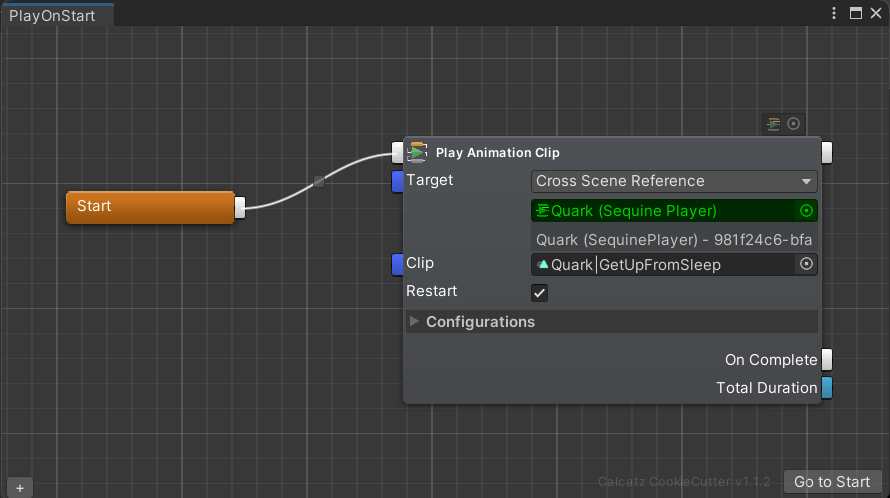
        <content type="html"><![CDATA[<p>Sequine has been updated to version 1.4.0 which includes major updates revolving around the new cross-scene system, that is called <strong>Cross-Scene Reference</strong>.</p><p>The old cross-scene system, Cross-Scene Binding, did not scale well with a project that utilizes a lot of cross-scene objects.
A large amount of cross-scene objects means that we will have a lot of binder assets cluttering in our project, which maybe cumbersome to manage.</p><p>The new system, <strong>Cross-Scene Reference</strong>, scrapped the use of a binder asset.
It works seamlessly just like when we target a scene's object directly, without additional configurational step.</p><p><img loading="lazy" alt="Cross-Scene Reference" src="/assets/images/cross-scene-reference-80d5eee4e61932f24028599b23fed3b9.png" width="890" height="498" class="img_ev3q"></p><p>Every affected command has been adjusted to work with the new system.</p><p>However, the <strong>old system</strong> is still kept as a <strong>legacy</strong> feature, to maintain compatibility for long time users.</p><p>Check out the full description in <a href="/docs/sequine-flow/cross-scene-system">Cross-Scene System</a>.</p><p>Release Notes: <a href="https://assetstore.unity.com/packages/tools/visual-scripting/sequine-sequencing-animation-and-visual-scripting-260083#releases" target="_blank" rel="noopener noreferrer">https://assetstore.unity.com/packages/tools/visual-scripting/sequine-sequencing-animation-and-visual-scripting-260083#releases</a></p>]]></content>
        <author>
            <name>Dilaura</name>
            <uri>https://twitter.com/dilaura_exp</uri>
        </author>
    </entry>
    <entry>
        <title type="html"><![CDATA[Unity "Fresh Assets" Sale!]]></title>
        <id>https://sequine.calcatz.com/blog/fresh-assets</id>
        <link href="https://sequine.calcatz.com/blog/fresh-assets"/>
        <updated>2024-02-14T00:00:00.000Z</updated>
        <summary type="html"><![CDATA[We would like to announce that Unity's "Fresh Assets" sale has just begun!]]></summary>
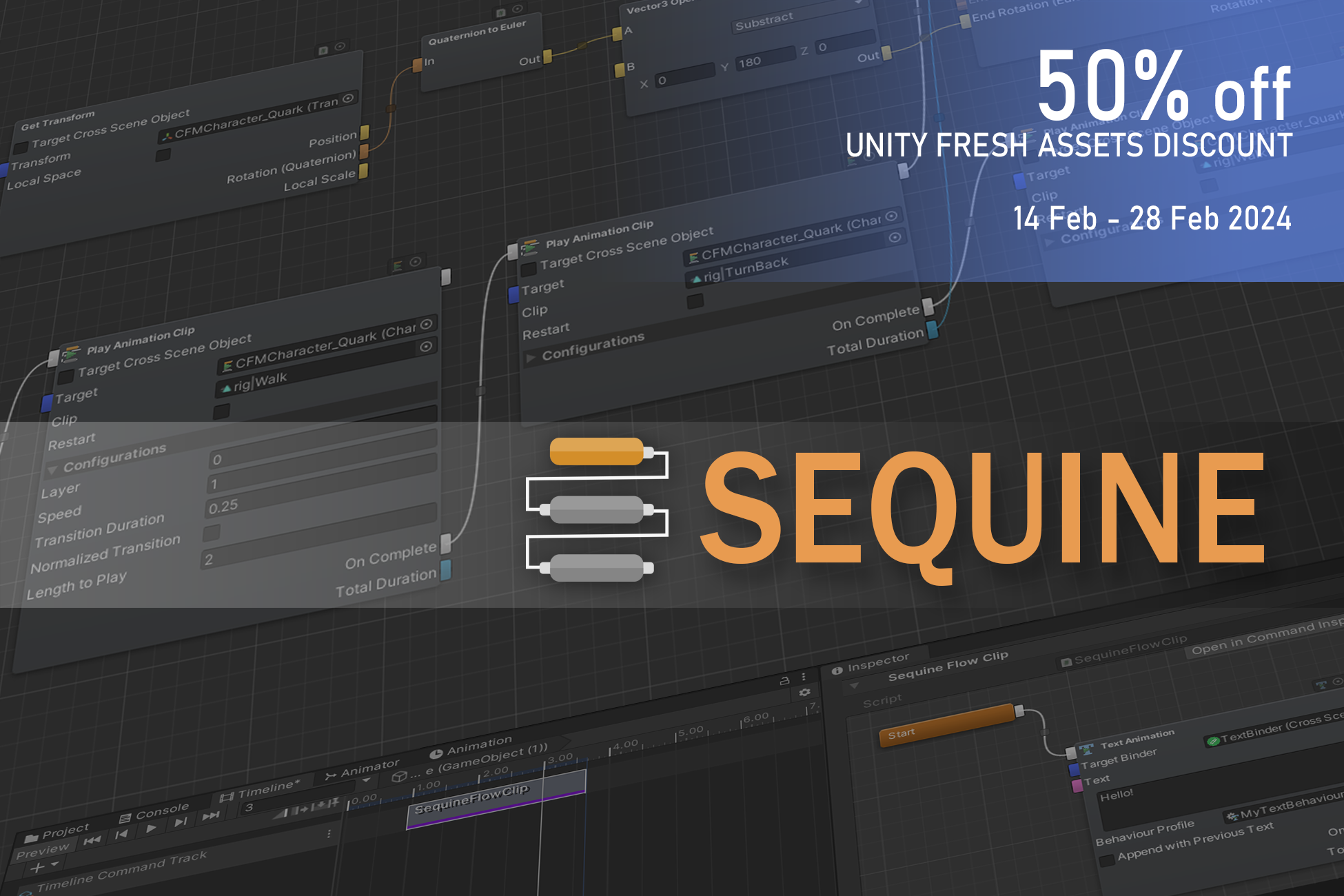
        <content type="html"><![CDATA[<p>We would like to announce that Unity's "Fresh Assets" sale has just begun!
Sequine is included as well, with 50% discount during February 14 through 28, 2024.
And so, <a href="https://assetstore.unity.com/packages/slug/260083" target="_blank" rel="noopener noreferrer">grab it</a> before the sale ends!</p><p><img loading="lazy" alt="Sequine Fresh Assets Sale" src="/assets/images/FreshAssetsDiscount-2eebffbca7e22cfff88337ea57902321.png" width="1950" height="1300" class="img_ev3q"></p><p>Lastly, we'd like to remind you that you can also join our <a href="https://discord.gg/eKCsj9NxMf" target="_blank" rel="noopener noreferrer">Discord</a> channel if you have questions and/or suggestions. Also, please kindly follow our <a href="https://twitter.com/sequine_tool" target="_blank" rel="noopener noreferrer">social media</a> too.</p>]]></content>
        <author>
            <name>Dilaura</name>
            <uri>https://twitter.com/dilaura_exp</uri>
        </author>
    </entry>
    <entry>
        <title type="html"><![CDATA[Sequine v1.3.0 Highlights]]></title>
        <id>https://sequine.calcatz.com/blog/highlight</id>
        <link href="https://sequine.calcatz.com/blog/highlight"/>
        <updated>2023-09-13T00:00:00.000Z</updated>
        <summary type="html"><![CDATA[Sequine has been updated to version 1.3.0. What's new in our new version?]]></summary>
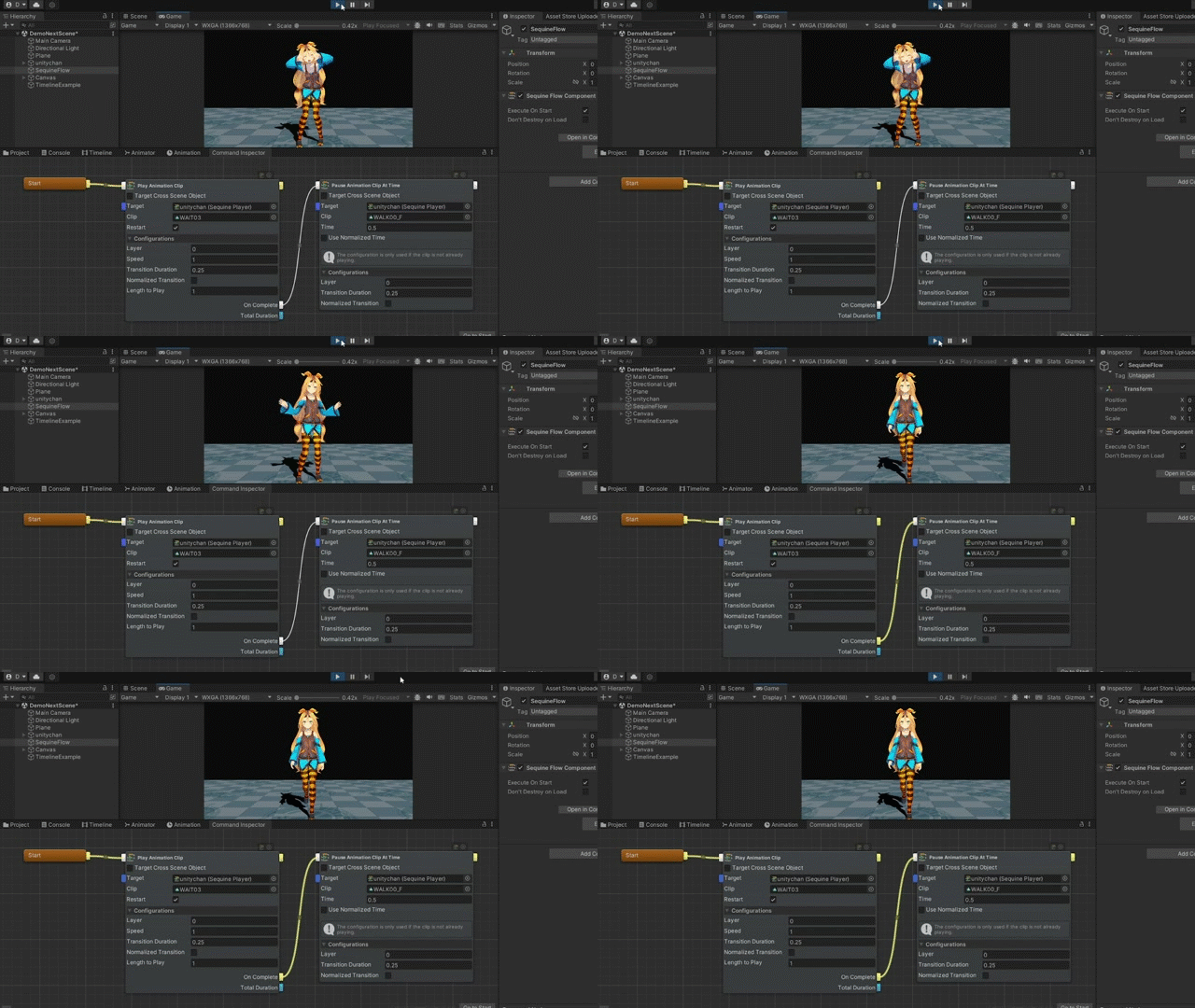
        <content type="html"><![CDATA[<p>Sequine has been updated to version 1.3.0. What's new in our new version?</p><h3 class="anchor anchorWithStickyNavbar_LWe7" id="1-various-ways-of-pausing-and-resuming-animations">1. Various Ways of Pausing and Resuming Animations<a href="#1-various-ways-of-pausing-and-resuming-animations" class="hash-link" aria-label="Direct link to 1. Various Ways of Pausing and Resuming Animations" title="Direct link to 1. Various Ways of Pausing and Resuming Animations">​</a></h3><p>Using <a href="/docs/all-commands/animation/clip-control/pause-animation-clip-at-time">Pause Animation Clip At Time</a> command, we can sample a certain pose at certain Time of an animation clip.
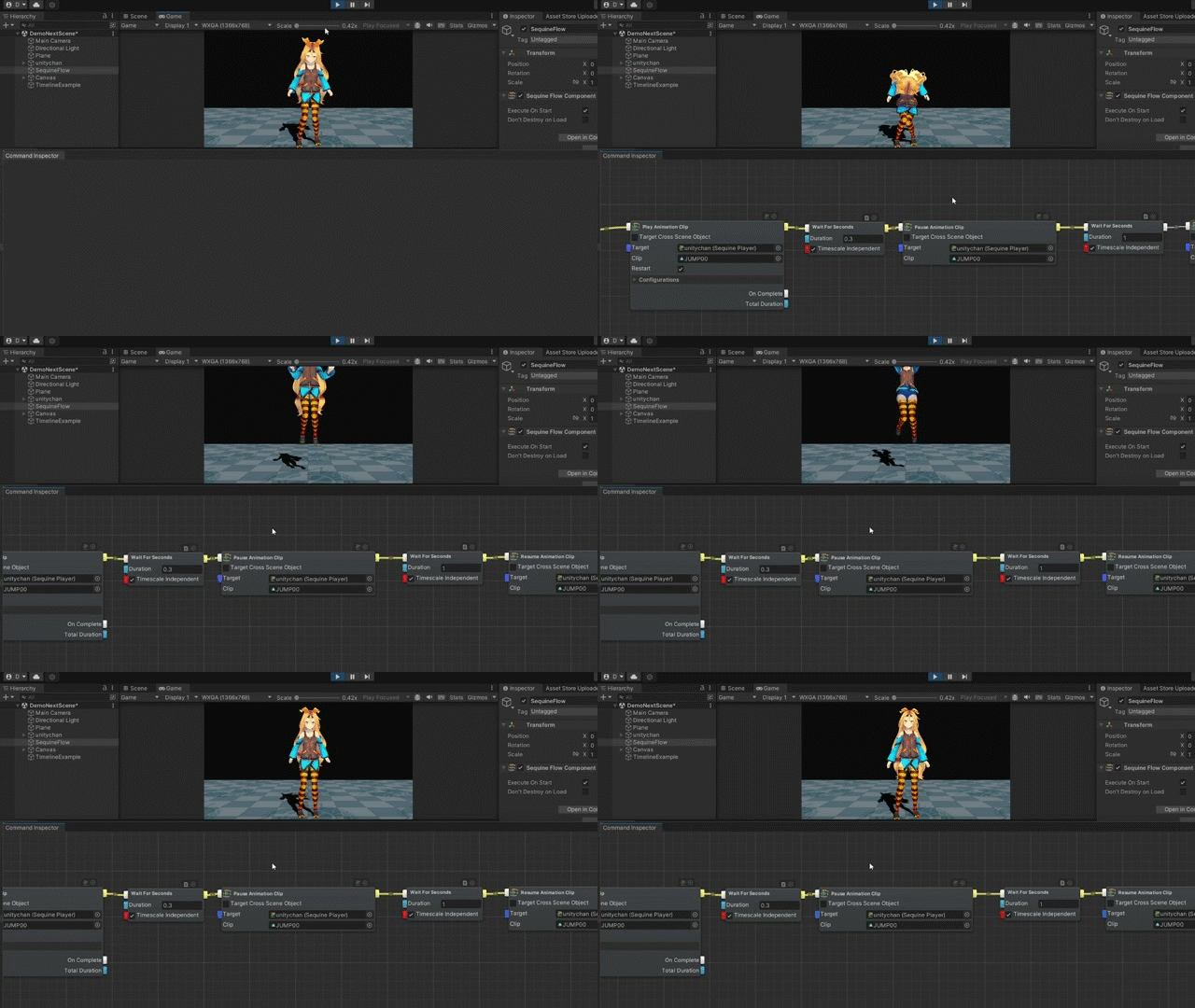
That way, we don't have to create a new animation clip if we want to create a new pose.</p><p><img loading="lazy" alt="Pause Animation Clip at Time" src="/assets/images/highlight-pause-animation-clip-at-time-0581f970bdaefcc8318cb880ca7c6754.gif" width="640" height="360" class="img_ev3q"></p><p>There are also new commands added in <a href="/docs/all-commands/animation/clip-control/play-animation-clip">Clip Control</a>, to pause and resume certain clips.
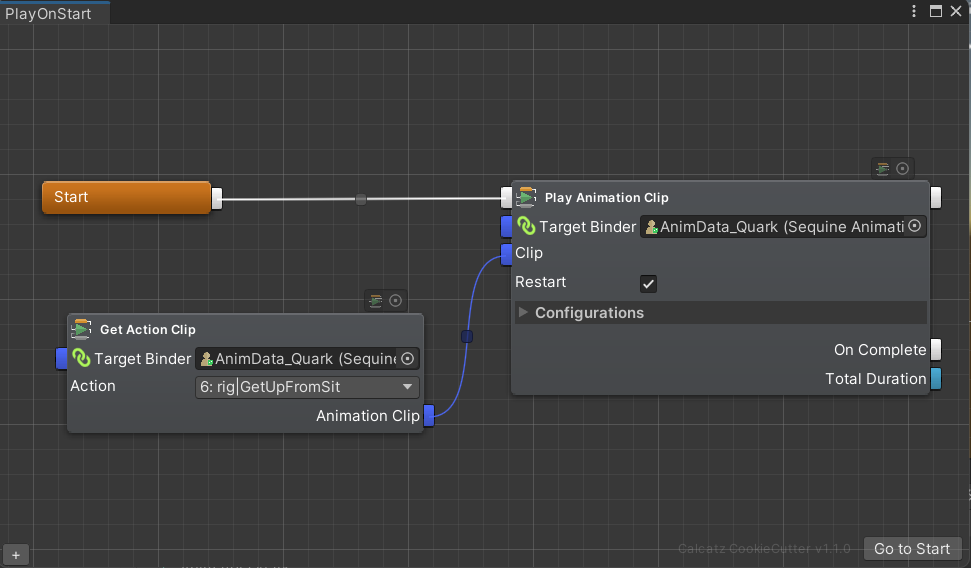
Combined with <a href="/docs/all-commands/flow/wait-for-seconds">Wait For Seconds</a> command and such, we can recreate our prefered timing.</p><p><img loading="lazy" alt="Pause ResumeAnimation Clip" src="/assets/images/highlight-pause-resume-f68a811ff7a1fda7f499b7676fa194b9.gif" width="640" height="360" class="img_ev3q"></p><h3 class="anchor anchorWithStickyNavbar_LWe7" id="2-alternative-ways-of-playing-animation-clips">2. Alternative Ways of Playing Animation Clips<a href="#2-alternative-ways-of-playing-animation-clips" class="hash-link" aria-label="Direct link to 2. Alternative Ways of Playing Animation Clips" title="Direct link to 2. Alternative Ways of Playing Animation Clips">​</a></h3><p>Any command that has Clip field now has in-point to set the clip dynamically.
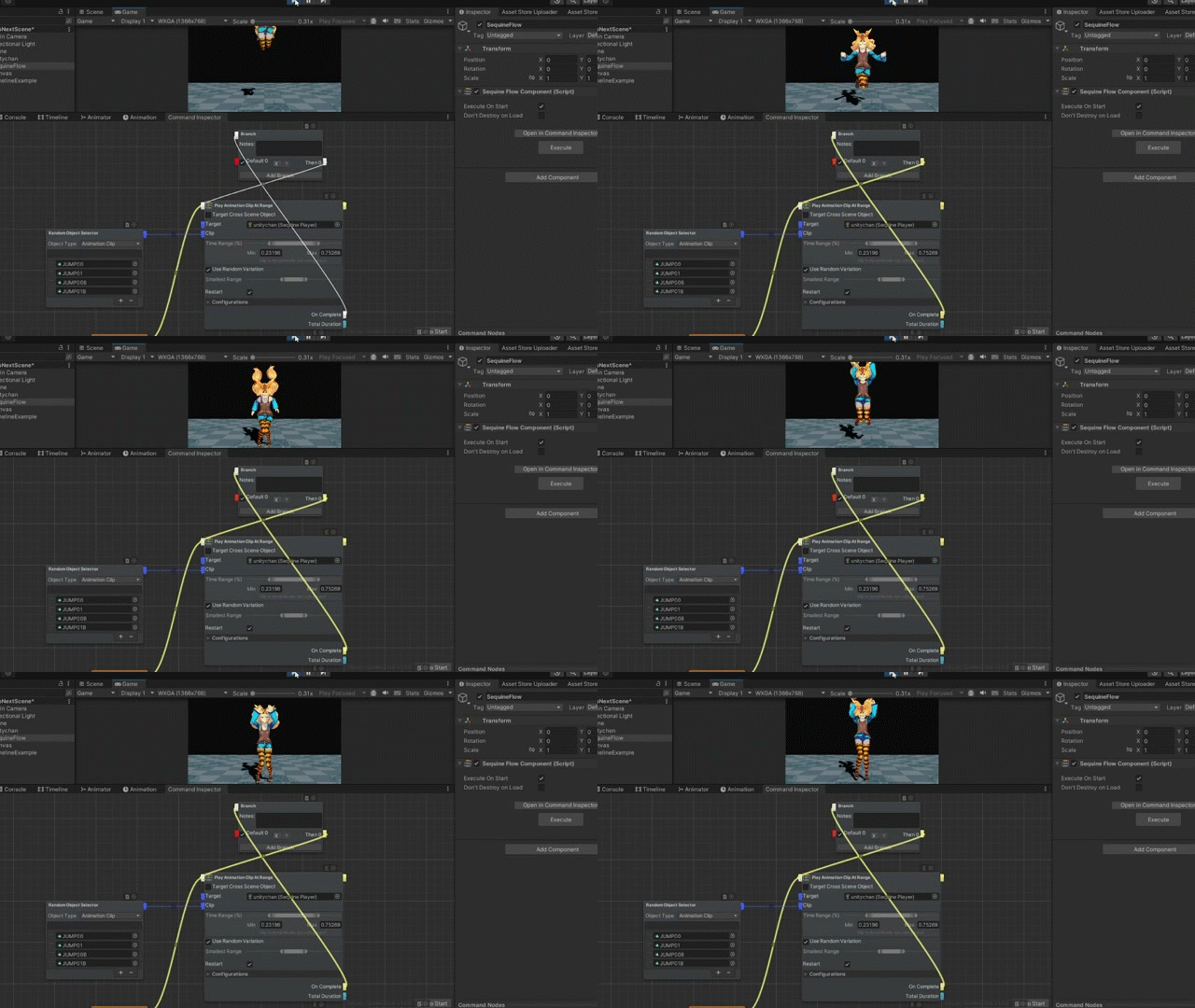
Now we can also get the actual animation clip of an Action.</p><p><img loading="lazy" alt="Play Animation Clip at Range" src="/assets/images/get-action-clip-839554bdbb8200b0b7181f0294c70b4a.png" width="971" height="568" class="img_ev3q"></p><h3 class="anchor anchorWithStickyNavbar_LWe7" id="3-play-animation-clip-at-range">3. Play Animation Clip at Range<a href="#3-play-animation-clip-at-range" class="hash-link" aria-label="Direct link to 3. Play Animation Clip at Range" title="Direct link to 3. Play Animation Clip at Range">​</a></h3><p>We can use <a href="/docs/all-commands/animation/clip-control/play-animation-clip-at-range">Play Animation Clip At Range</a> command to play an animation clip within the specified time range percentage.
Random range variation can also be added by specifying the Smallest Range, so that the range would be randomized between the Smallest Range and Max Range.</p><p>Combined with <a href="/docs/all-commands/zz_property/random-object-selector">Random Object Selector</a> command, we can animate even more procedurally.</p><p><img loading="lazy" alt="Play Animation Clip at Range" src="/assets/images/highlight-play-animation-clip-at-range-11d7e81020e9ee8393d78cb8101a9669.gif" width="640" height="360" class="img_ev3q"></p>]]></content>
        <author>
            <name>Dilaura</name>
            <uri>https://twitter.com/dilaura_exp</uri>
        </author>
    </entry>
    <entry>
        <title type="html"><![CDATA[Our First Release, with 50% Launch Discount!]]></title>
        <id>https://sequine.calcatz.com/blog/release</id>
        <link href="https://sequine.calcatz.com/blog/release"/>
        <updated>2023-09-07T00:00:00.000Z</updated>
        <summary type="html"><![CDATA[We are happy to announce that our first version of Sequine has been released on the Asset Store! Kindly check it out, and be sure not to miss out our 50% launch discount for two weeks!]]></summary>
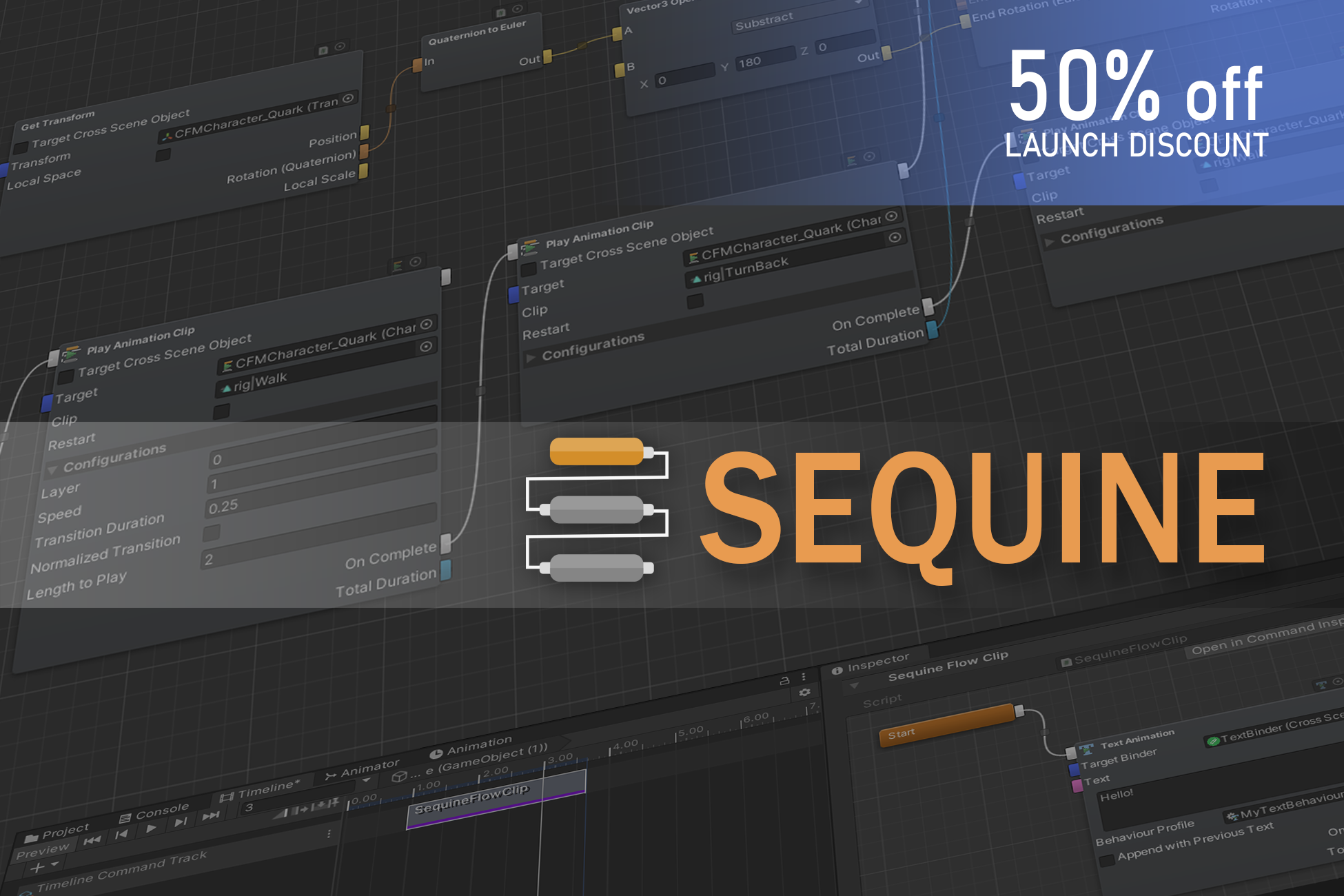
        <content type="html"><![CDATA[<p>We are happy to announce that our first version of Sequine has been released on the <a href="https://assetstore.unity.com/packages/slug/260083" target="_blank" rel="noopener noreferrer">Asset Store</a>! Kindly check it out, and be sure not to miss out our 50% launch discount for two weeks!</p><p><img loading="lazy" alt="Sequine Asset Store Cover" src="/assets/images/SequineCover-5baf43cdd6d54cc1feb30bf697b522e6.png" width="1950" height="1300" class="img_ev3q"></p><p>We'd be very happy to hear your thoughts on our Tool as well. If you have questions or suggestions, you can join our <a href="https://discord.gg/eKCsj9NxMf" target="_blank" rel="noopener noreferrer">Discord</a> channel, and kindly follow the <a href="https://twitter.com/sequine_tool" target="_blank" rel="noopener noreferrer">social media</a> too.</p>]]></content>
        <author>
            <name>Dilaura</name>
            <uri>https://twitter.com/dilaura_exp</uri>
        </author>
    </entry>
</feed>